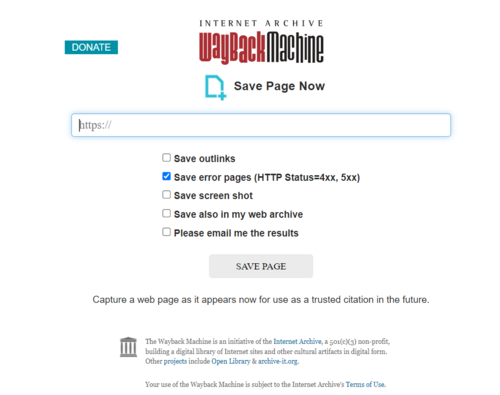
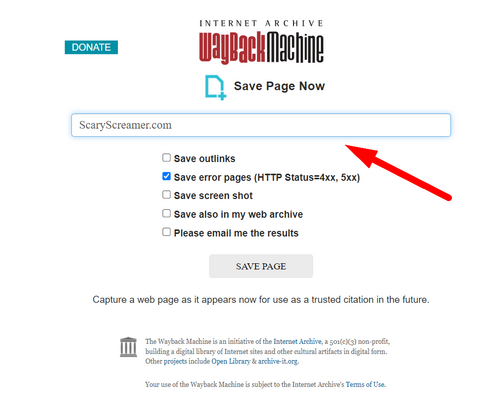
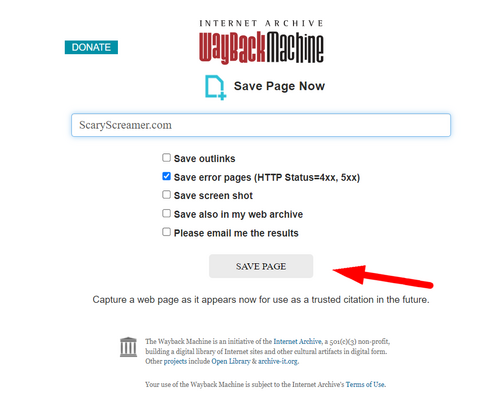
If you want to archive a website, use the [https://web.archive.org/save Wayback Machine] or [https://archive.ph/ archive.ph] and paste the link into the appropriate box. It is also recommended to archive any subpages on the website itself. Here is a simple tutorial:
If you want to archive a website, use the [https://web.archive.org/save Wayback Machine] and paste the link into the appropriate box. It is also recommended to archive any subpages on the website itself. Here is a simple tutorial:
[[File:Save1.png|500px|center|link=]]
[[File:Save1.png|500px|center|link=]]
Line 11:
Line 11:
<br>
<br>
[[File:Save3.png|500px|center|link=]]
[[File:Save3.png|500px|center|link=]]
<br>
<br>
<br>
<br>
* Archive.ph:
[[File:ArchivePage1.png|500px|center|link=]]
<br>
<br>
[[File:ArchivePage2.png|500px|center|link=]]
<br>
<br>
[[File:ArchivePage3.png|500px|center|link=]]
<br>
<br>
<br>
<br>
Line 29:
Line 16:
<br>
<br>
== Archiving Videos ==
== Archiving Videos ==
To archive a YouTube video, copy the link and paste it into a website to download your video ([https://y2mate.com/ y2mate] is recommended). Lastly, upload the file to [https://catbox.moe/ catbox.moe] and save it on the [https://web.archive.org/save Wayback Machine].
'''See:''' [[Screamer Wiki:How To Permalink]]
'''See also:''' [[Screamer Wiki:How To Permalink]]
{{Comments}}
{{Comments}}
Latest revision as of 21:00, 6 April 2026
When discovering a screamer, it's crucial to archive the video or website to prevent it from being lost or altered. Here are a few easy steps to achieve this.
Archiving Websites
If you want to archive a website, use the Wayback Machine and paste the link into the appropriate box. It is also recommended to archive any subpages on the website itself. Here is a simple tutorial: